
Loading the master
The lossless HuffYUV file in 4:2:2 enters the workflow with its field order correctly specified. Every subsequent operation on interlaced material depends on that order.
From the analogue signal to your finished file: explore the workflow diagram, the equipment we use and every stage of picture and sound restoration.
The full restoration process described here is included in the PLN 200 service. The PLN 70 option includes basic picture correction, basic audio level adjustment and MP4 AVC/H.264 delivery. Archival masters, additional formats, cleaning and repairs require separate agreement. Pricing.
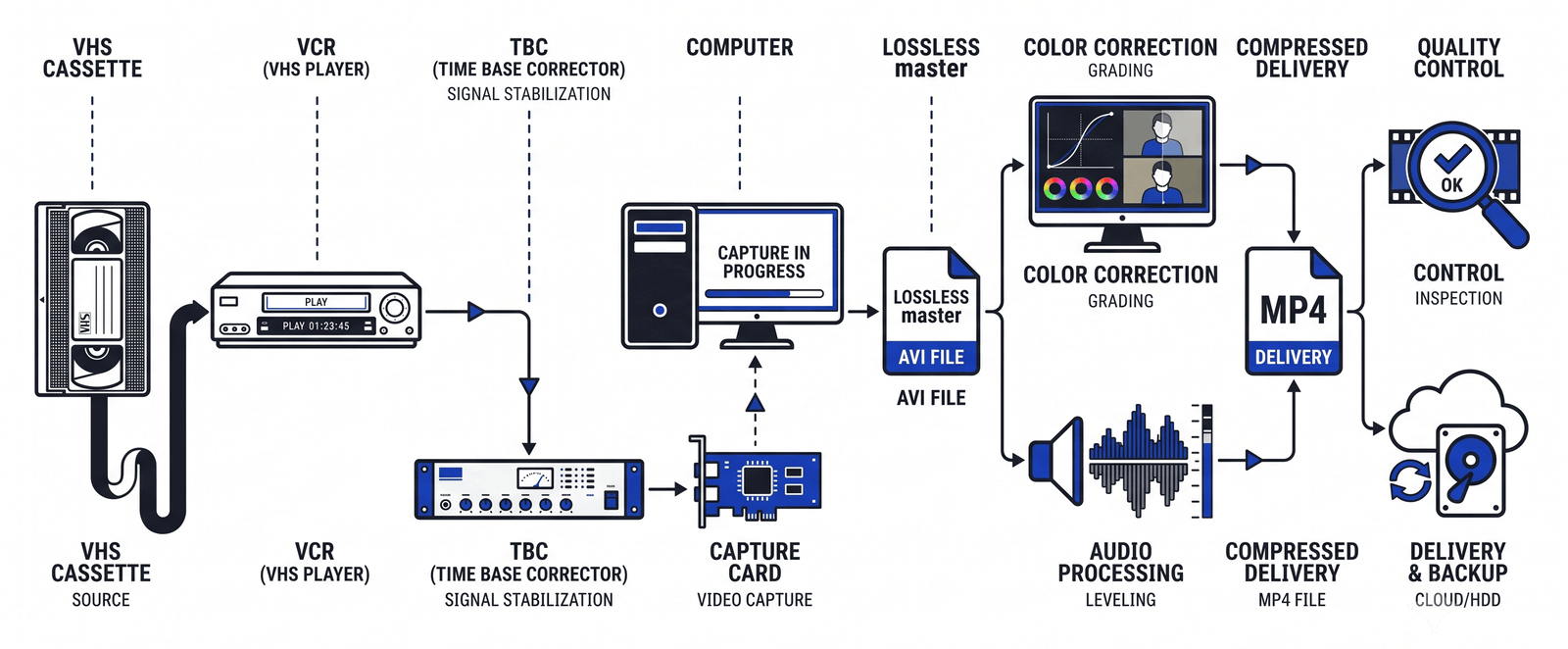
On a small screen, scroll the diagram horizontally. The same stages are described in text below.
Good restoration starts with careful playback and capture. Our signal chain combines S-VHS decks, time-base correction and lossless capture. We then process a digital copy to prepare the viewing file.
The signal chain is designed to recover the information still present on the tape, stabilise the signal and avoid unnecessary losses during processing. Restoration is performed on a copy of the lossless capture, so the original digital master stays unchanged while we compare and adjust the results.
For picture restoration, our tailored AviSynth workflow uses individually tuned filters without artificial intelligence or generative models. It works with the recorded picture rather than inventing faces, textures or details that were never there.
Service scope: the full picture and sound restoration described here is included in the PLN 200 option. The PLN 70 option includes basic picture correction, basic audio level adjustment and an MP4 AVC/H.264 file. Both prices apply per cassette, regardless of recording length. Compare the two options.
The degree of improvement depends on the tape's condition and the quality of the original recording. Restoration cannot recover information that was never recorded or has been irretrievably lost.
JVC and Panasonic S-VHS players with built-in line TBC and noise reduction. We select the playback setup for the tape. Line TBC corrects timing variations within individual scan lines, helping to steady the picture at the playback stage.
Signal stabilisation before capture involves line correction and frame synchronisation. We choose the devices and settings to suit the recording. Line correction may take place in the deck or in a suitable DVD recorder used in passthrough mode. We distinguish this quasi-TBC behaviour from full-frame correction in a dedicated device. Our VHS capture guide explains the roles of these solutions.
ATI capture cards run in computers configured specifically for real-time capture. We monitor recording continuity and video levels, checking for dropped frames and colour problems throughout the transfer.
HuffYUV, a lossless codec. The digital capture is compressed without discarding image data. This large working file is our digital master, from which the restoration and delivery versions are made. Lossless compression describes the digital recording; it does not remove the limitations of the analogue source.
AviSynth with a tailored 12-stage restoration workflow, tuned individually for each tape: chroma correction, treatment of tape defects, deinterlacing that preserves source pixels where possible, motion-compensated denoising and controlled sharpening. Read the full stage-by-stage description.
Professional audio restoration tools in the same class as iZotope RX support spectral analysis and editing, noise reduction based on the recording's noise profile, reduction of mains hum and its harmonics, click and crackle reduction, speech-focused equalisation and dynamics control. The PLN 200 service includes sound restoration. We select the processing steps for each recording to improve intelligibility while keeping voices natural. Loudness settings depend on the source and intended playback; an EBU R128 target can be used where appropriate for the agreed output.
MainConcept encoders prepare the viewing file with settings chosen to balance picture quality and file size. Standard delivery is MP4 with AVC/H.264 video. H.265, ProRes for editing and the untouched lossless master can be supplied under a separate agreement covering the format, storage requirements and cost.
Four phases: first we read and stabilise the tape signal, then capture it with lossless compression. Picture and sound restoration follow on a digital copy, before encoding and quality control. This is the full restoration workflow for the PLN 200 service.
We assess the cassette shell, guides and tape for mould, splices and damage before playback. Checking a tape is free. If cleaning or repairs are needed, we explain the proposed work and its cost and obtain approval before proceeding. This preparation helps protect the recording and the playback heads.
The tape is played on a JVC or Panasonic S-VHS deck. We choose the deck and the line TBC and noise-reduction settings to suit the source. Correcting timing variations within the scan lines at this stage gives subsequent processing a more stable starting point.
We stabilise the signal reaching the capture card, selecting line correction and frame synchronisation to address the tape's particular faults. The deck's TBC does not need to be enabled in every configuration. We assess the settings in the recorded file, checking both picture geometry and continuity of motion.
Our capture computers use ATI cards to record video in real time with HuffYUV 4:2:2 compression. This lossless codec preserves the captured digital image data. The resulting master is the source for restoration and comparison; a copy for your own archive is available by separate agreement.
A copy of the master passes through a tailored 12-stage workflow in AviSynth: chroma correction, treatment of tape defects, deinterlacing, motion-compensated denoising and controlled sharpening. Settings are selected for the tape and adjusted as the recording requires. The individual stages are described below.
Included in the PLN 200 service, sound treatment can combine spectral analysis and editing, noise reduction based on the tape's noise profile, reduction of mains hum and its harmonics, click and crackle reduction, speech-focused equalisation and dynamics control. We adjust the loudness for the recording and intended playback, using an EBU R128 target where appropriate for the agreed output. We aim for clear dialogue and natural voices. Processing cannot guarantee the recovery of speech masked by noise or missing from the recording.
The finished recording is encoded using MainConcept tools as an MP4 file with AVC/H.264 video as standard. One cassette becomes one file, with blank sections at the beginning and end removed. The file name contains the unique order ID and the cassette number. H.265, ProRes for editing or the untouched lossless master require a separate agreement on format, storage and cost.
We follow a consistent procedure to review the file, comparing frames before and after restoration against the source. Picture stability, processing artefacts, audio clarity and synchronisation are checked before the file is prepared for delivery.
Writing the files to your USB flash drive or external drive, or making them available in the cloud, is included. A USB drive supplied by AMG Media or a Blu-ray disc is available at an additional agreed cost. We keep a backup copy on separate media for 30 days after you confirm receipt, then delete it unless extended storage has been agreed. For long-term archiving, retain your own copies; delivery of a lossless master is arranged separately. See delivery and payment details.
These are the technical stages of our full picture restoration workflow. The processing and its strength are selected for each recording, with comparisons against the unchanged source master throughout.
The lossless HuffYUV file in 4:2:2 enters the workflow with its field order correctly specified. Every subsequent operation on interlaced material depends on that order.
The picture is converted to a planar format, allowing filters to work on luminance and colour separately while maintaining processing precision.
We adjust brightness, contrast and saturation while checking the video levels, including the nominal 16-235 luma range for 8-bit limited-range video. We avoid automatic white balance to prevent unwanted colour fluctuations between shots.
Chroma noise is reduced across the frame and the colour layer is aligned with the luminance edges where the source requires it. This reduces colour displacement around outlines.
White streaks, tears and dropouts are treated separately in the two fields, preserving the interlace structure before deinterlacing. Repair strength is limited to avoid disturbing genuine picture detail.
For PAL footage with 50 fields per second, deinterlacing produces fluid 50-frame-per-second video. The algorithm uses the source information and preserves original pixels where possible. Controlled retention of grain helps keep a natural texture instead of a waxy appearance. For other source standards, the output frame rate is matched to the source timing.
Motion analysis tracks image areas with sub-pixel precision so noise can be averaged along the estimated motion paths. Scene-cut detection helps prevent processing across unrelated shots, reducing the risk of ghosting at edits.
Temporal analysis compares each frame with its neighbours to identify isolated defects remaining after earlier stages. Thresholds are tuned to avoid treating genuine picture details that appear briefly as damage.
Sharpening works on an image supersampled to 150%, with an overshoot limiter to restrain bright halos. Temporal smoothing helps prevent grain from flickering after sharpening, and the strength is checked against the original.
The picture returns to 4:2:2 for the subsequent processing chain. The delivery file is then encoded with the pixel format and codec settings appropriate to the agreed output.
We remove the head-switching noise band at the bottom and unwanted analogue artefacts at the edges, centre the 4:3 picture and scale it carefully to the target resolution. Framing is checked so the clean-up does not remove useful picture content unnecessarily.
Our restoration computers process the footage using multiple threads and pass the result directly to the encoder. This avoids an intermediate stage of lossy encoding.
Individual settings: denoising strength, grain retention and repair thresholds are tuned for each tape. A wedding filmed in a dark hall calls for different treatment from a sunny outdoor scene. The goal is a clean, natural result that remains faithful to the recorded material.
Later filters depend on the information captured from the tape. Choosing the deck, playback settings and TBC setup carefully gives restoration a better source to work with.
Line TBC corrects timing within individual scan lines, while the external unit stabilises frame timing and synchronisation for capture. They address different parts of an unstable analogue signal.
HuffYUV compression retains the captured image data without lossy encoding. If you separately order and keep a copy of the master, it can serve as a source for future editing or restoration. Our studio backup is retained for 30 days after confirmed receipt.
Restoration is performed on a copy. During the work, we can change filter settings and render a new result from the original digital capture instead of repeatedly processing an already altered file.
Interlaced VHS contains motion information in successive fields. Our deinterlacing workflow uses that information to produce smooth progressive video, including 50 frames per second from suitable PAL footage, while limiting unnecessary loss of detail.
MainConcept encoding tools let us select settings for quality, file size and playback. Standard MP4 AVC/H.264 delivery is intended for convenient viewing; editing and archival formats are selected separately when the order requires them.
Basic transfer costs PLN 70 per cassette; full picture and sound restoration costs PLN 200. Larger orders may qualify for a discount. Contact us to arrange your order or discuss additional formats.